What an academic misconduct panel needs to see
An AI-detection percentage is not evidence a panel can act on. What a panel can act on is a record of how the work was produced — what the student asked, what the AI gave back, what they kept, and when. If your misconduct process starts with a score, it ends in an argument about the score.
This is a practical guide to getting that record for one assignment, using Cognity, and what to do with it when a case comes up.
Why an AI score does not survive a hearing
Detectors estimate how predictable a piece of text is. The estimate is not tied to anything the student did, so the student cannot answer it and the panel cannot test it. Vendor accuracy figures are self-published and move depending on how much of a document counts as flagged.
The errors are also not spread evenly. In a 2023 study in Patterns, seven commercial detectors classified essays by non-native English writers as AI-generated while classifying native speakers' essays correctly. In a university with international students, the same people absorb the errors every term.
What a panel can act on instead
- A record of the work as it was produced — prompts, AI responses, edits and rejections, in sequence.
- The student's own account, asked for before they see the allegation: how did you work on this?
- The instructions they were given — what was allowed on this assignment, in writing, before they submitted.
Only the first is hard to obtain after the fact. That is the part worth arranging in advance, and it is what Cognity is for.
What the record looks like in Cognity
Students do the AI part of the work inside Cognity rather than in a separate chatbot, so nothing has to be reconstructed afterwards. Two views do most of the work in a case.
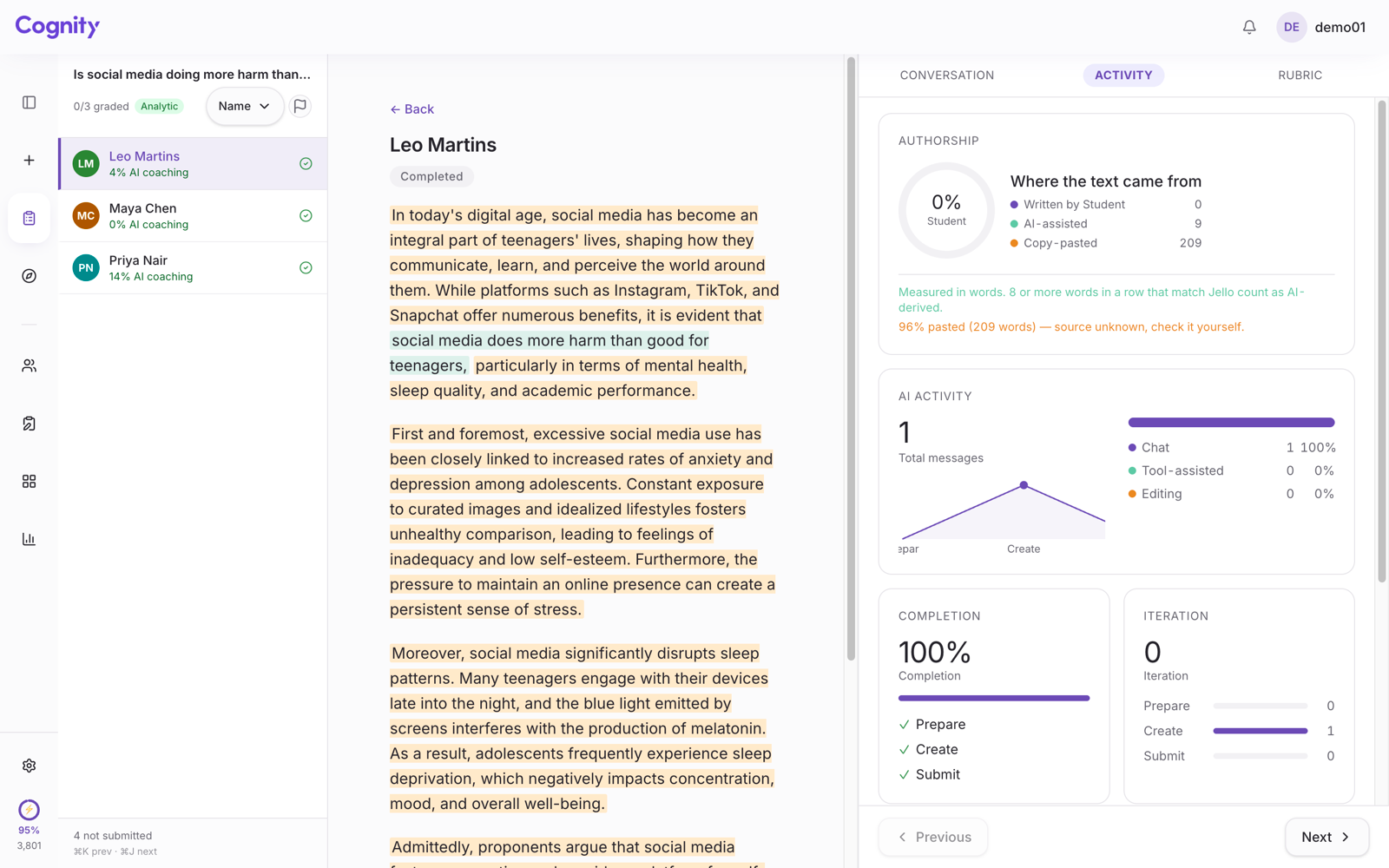
Authorship — where the text came from. Every submission separates what the student wrote, what came from the AI tutor, and what was pasted in from somewhere Cognity cannot see.
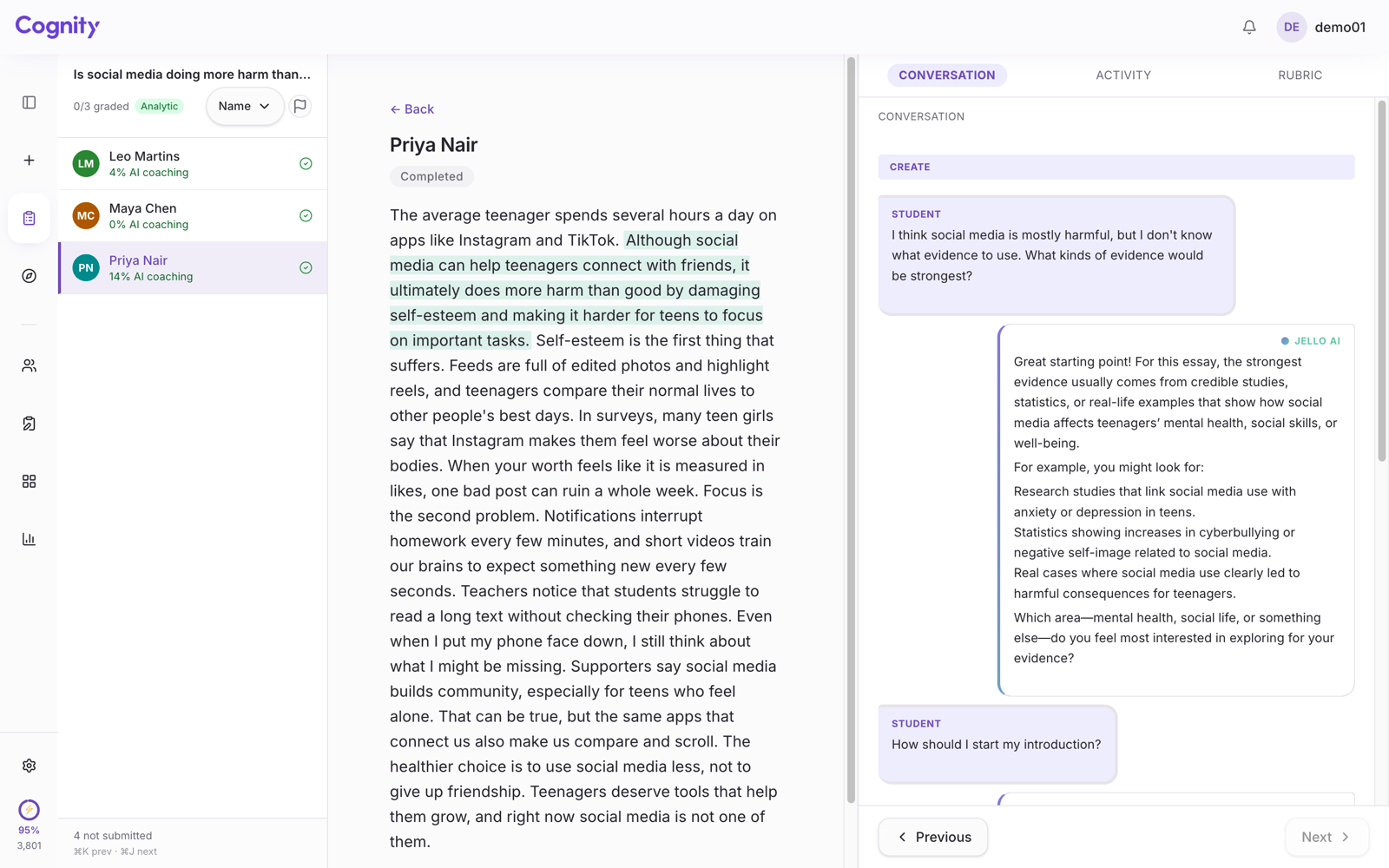
The conversation that produced it. The panel reads the exchange in order: what the student asked, what the AI answered, where they pushed back or took the suggestion whole.
Neither view produces a verdict. That is deliberate: what goes to a panel is what happened, and the judgement stays with the people who are supposed to make it.
How to set this up for one assignment
- Create the assignment in Cognity. Describe the task in a sentence; Cognity drafts the rubric and the AI tutor's instructions, which you then edit.
- Write the AI rule into the task itself — what is allowed, what must be acknowledged, what is not. Students see it where they work, not only in the course handbook.
- Give students the link, or launch Cognity from your LMS over LTI 1.3, which works on every plan. Rosters come from the LMS; there is nothing to import.
- Read one record before you grade. Ten minutes on a single submission tells you more about how your students are working than a term of detector scores.
- If something looks wrong, open the record with the student before opening a case. Most of what looks like misconduct turns out to be a student who did not know what was allowed.
What changes in a case
The conversation stops being adversarial. A panel reading a session sees where the student directed the work and where they accepted what they were handed — the distinction the regulations were always reaching for, visible without anyone estimating anything.
It protects the student who did the work, too. A record showing drafting, revision and rejection answers an accusation better than a denial does.
The higher education page sets out what this looks like across a cohort. If you want the argument against detectors in full, it is in How can a teacher tell if a student used ChatGPT?, and the comparison with Turnitin's process view is in Cognity vs Turnitin Clarity.
Cognity is free for individual teaching staff: 100 sparks a month, two active assignments, no credit card. Set one assessed task and read the first record when your students submit.